Money
Know who has paid. Today, not next week.
Fee recovery is the hardest part of running a school, and most of the difficulty is not collection. It is knowing where you stand.
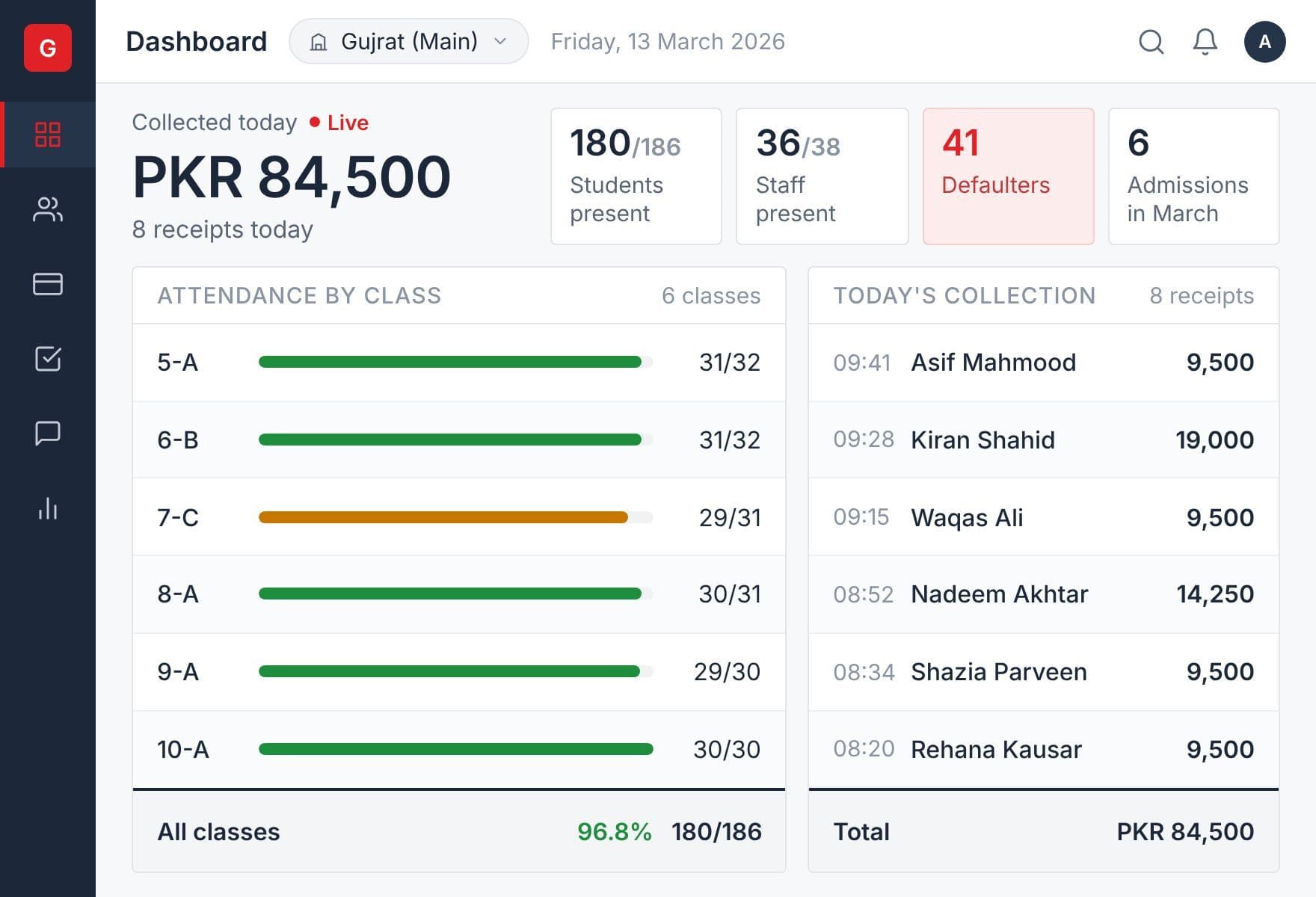
GLOWSIMS generates the vouchers, tracks what came in, and shows you the families who still owe — without anyone calling down a list.
Fee management is the oldest and deepest part of our platform. It has been shaped since 2013 by the fee structures of more than 1,200 Pakistani schools, which is why it handles the awkward cases your school actually has rather than the simple ones software usually assumes.
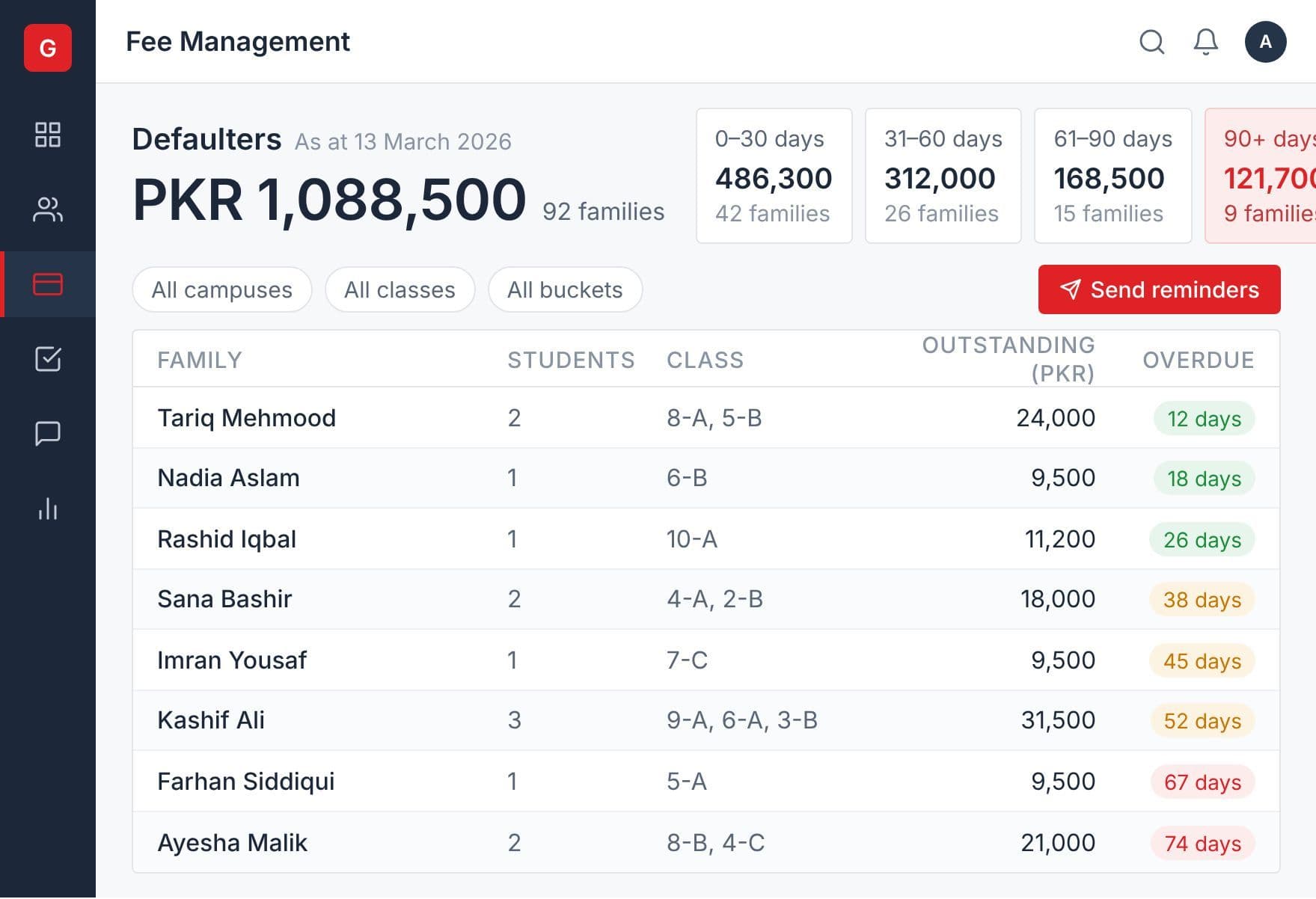
The defaulter list is the point
Open it and you see which families owe, how much, and how long it has been outstanding — in age buckets, so a family three months behind does not sit in the same line as one that is three days late.
Take a payment and the list updates. No overnight batch, no refresh at the end of the month.
From the same screen you can take the payment, print the last receipt, or open that student's full statement.
Remind the families who owe, without anyone making a call
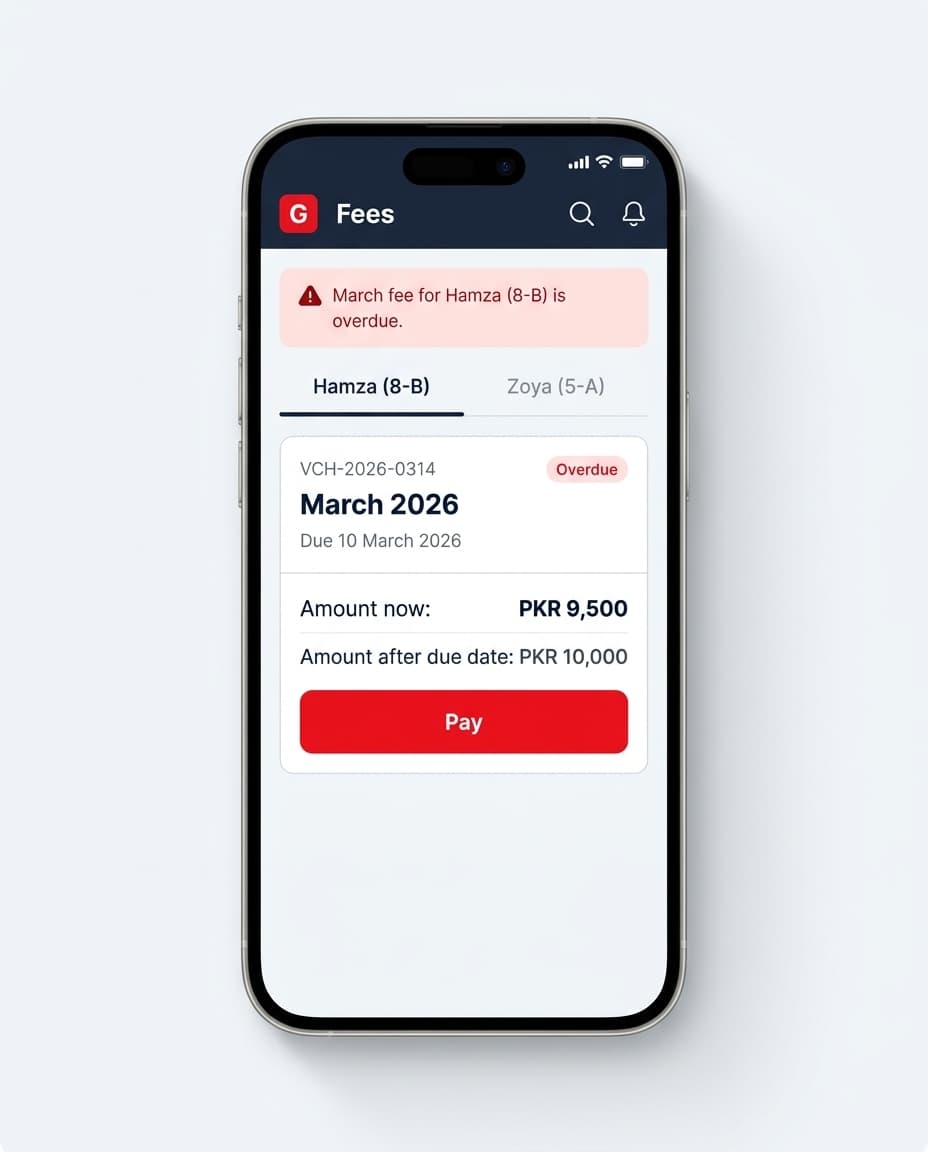
The defaulter list tells you who owes. The reminder is what gets them to pay.
GLOWSIMS sends the fee messages a school actually uses: the voucher is ready, the dues are outstanding, the payment is overdue, you are now a defaulter, and we have received your payment. They go out as an app notification or as an SMS.
Each message carries the figures from the ledger: the voucher amount, the arrears, the due date, what was paid and what is left. Nobody types an amount, so nobody types the wrong one.
Choose the fee head and the student status before you send. Withdrawn students who still owe you money are a filter, not a separate list kept by hand.
In Talib, the parent sees each unpaid voucher with the amount now and the amount after the due date. Where the school has online collection, the Pay button is on the same screen.
Take payment however the parent pays
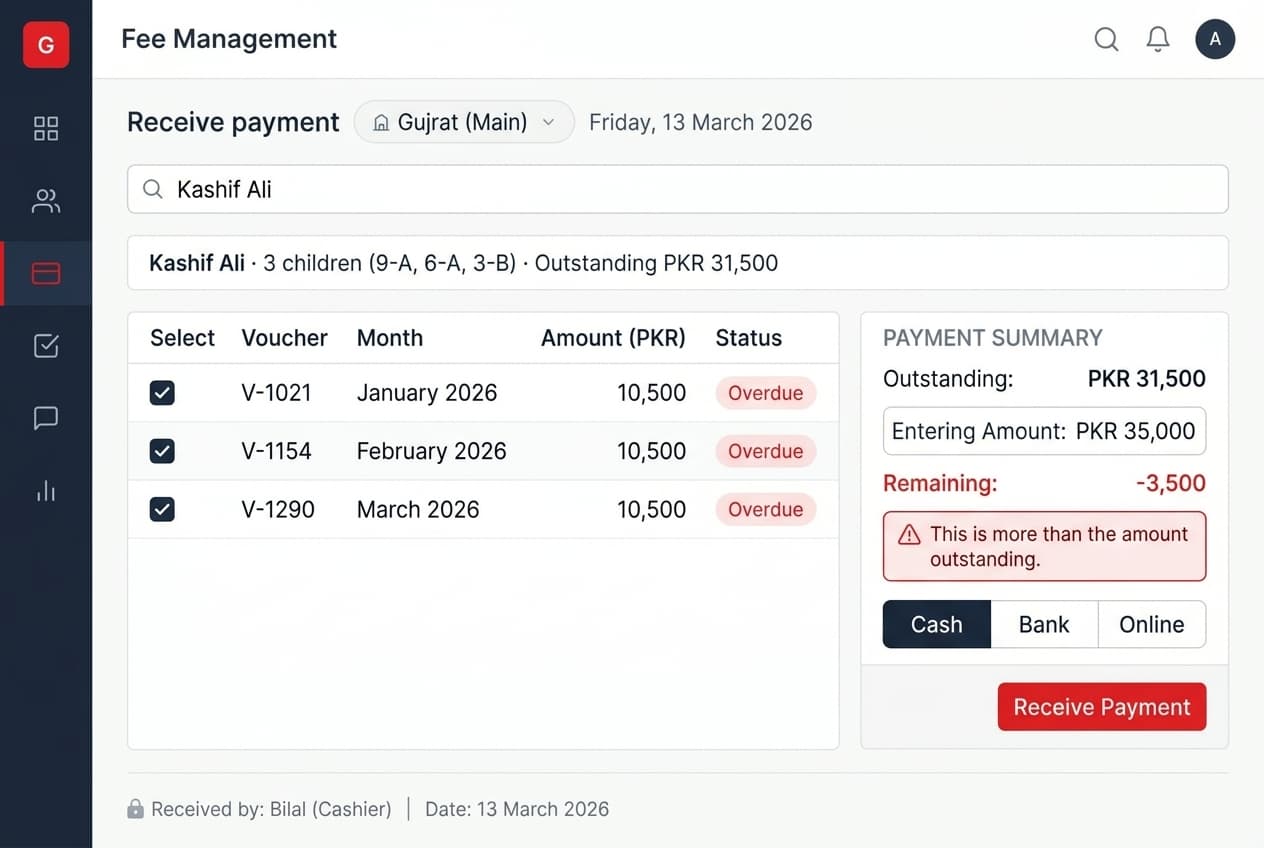
- At the desk — against a single voucher, or several at once. Search by student or by family identification, and settle the oldest first
- From the bank — upload the bank's payment file, map the columns once, and every valid row posts in one step. Rows that would overpay or point at a voucher that is already settled are flagged and held back rather than committed
- Online — the parent pays from the Talib app or through their own bank, and your cashier sees it arrive
- In instalments — split a voucher into a schedule with its own due dates. An instalment is paid in full or not at all, which is what keeps the schedule meaningful
- In advance — a parent who pays ahead leaves credit on the account, applied to the next voucher automatically or cleared against vouchers when you choose
Partial payment is handled the way you would expect. The cashier records what was received, the system carries the balance, and the outstanding amount appears as previous balance on the next printed voucher.
As the cashier types, the screen shows what is outstanding, what is being entered and what will remain — and turns red before an overpayment is saved rather than after.
Where a school writes off a small remainder, it is recorded as an expense rather than quietly disappearing.
The owner sees the day's collection without asking anyone
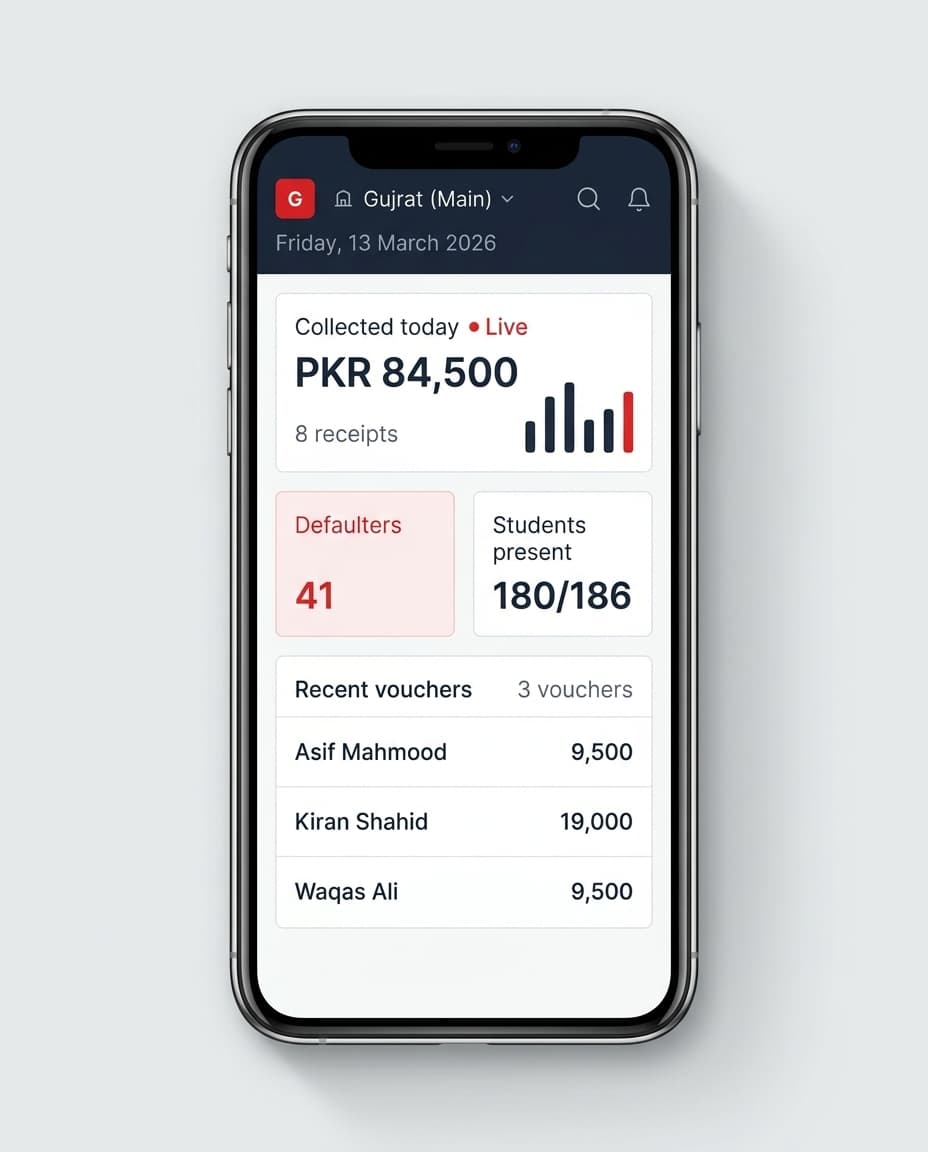
What the cashier takes at the desk is on the owner's phone the same day.
The Aliza dashboard shows the day as it stands: what came in today, the most recent vouchers, and collection across the last seven days. The month view shows what was collected and when, what is outstanding, revenue by class and by student, and the time of day parents tend to pay.
Owners who would rather not go looking can have a day-end collection summary sent to them.
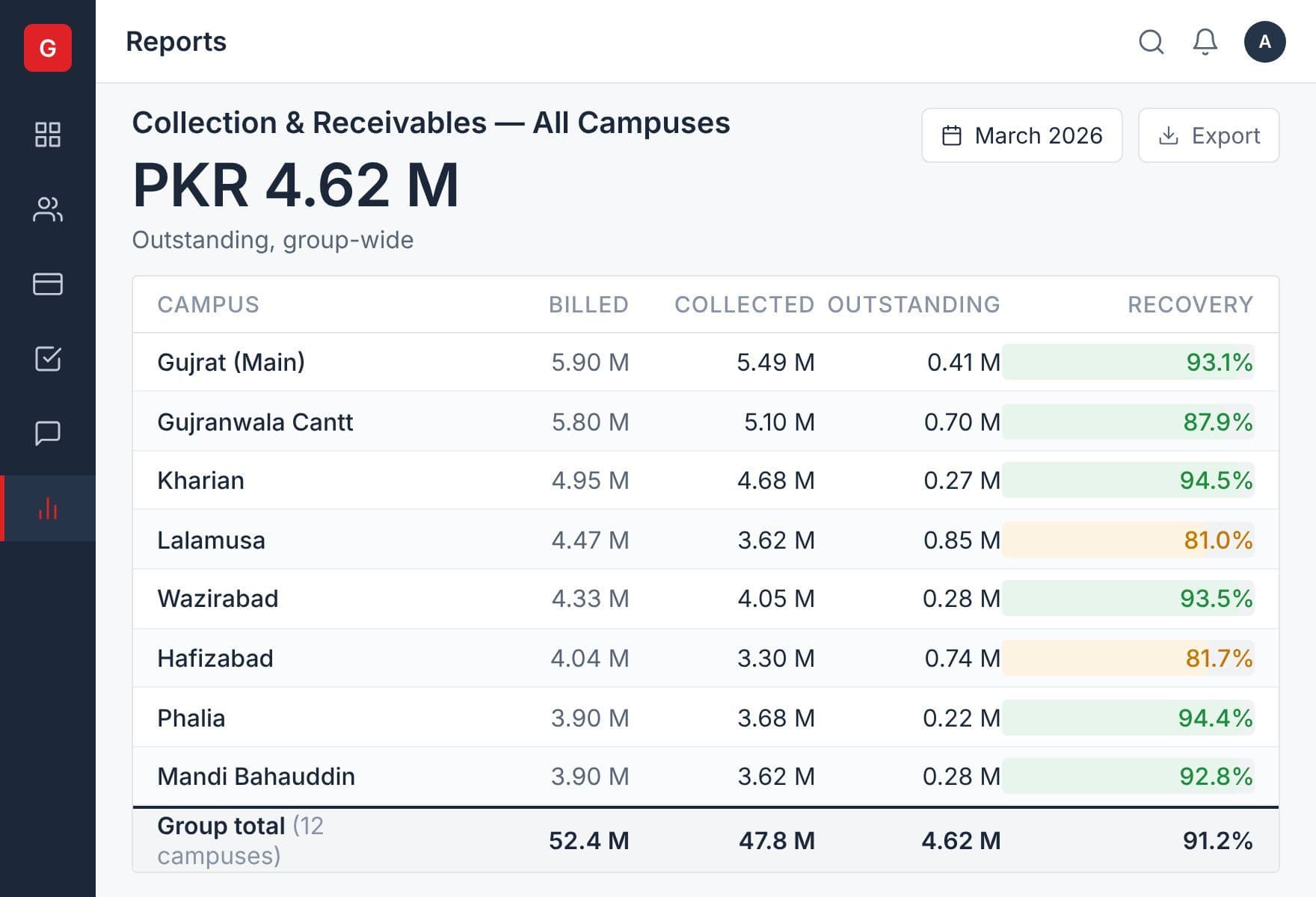
For a group, every campus sits under one sign-in. Organisation-wide reports put collection and receivables for each campus side by side.
Set it up once, and the monthly run becomes one action
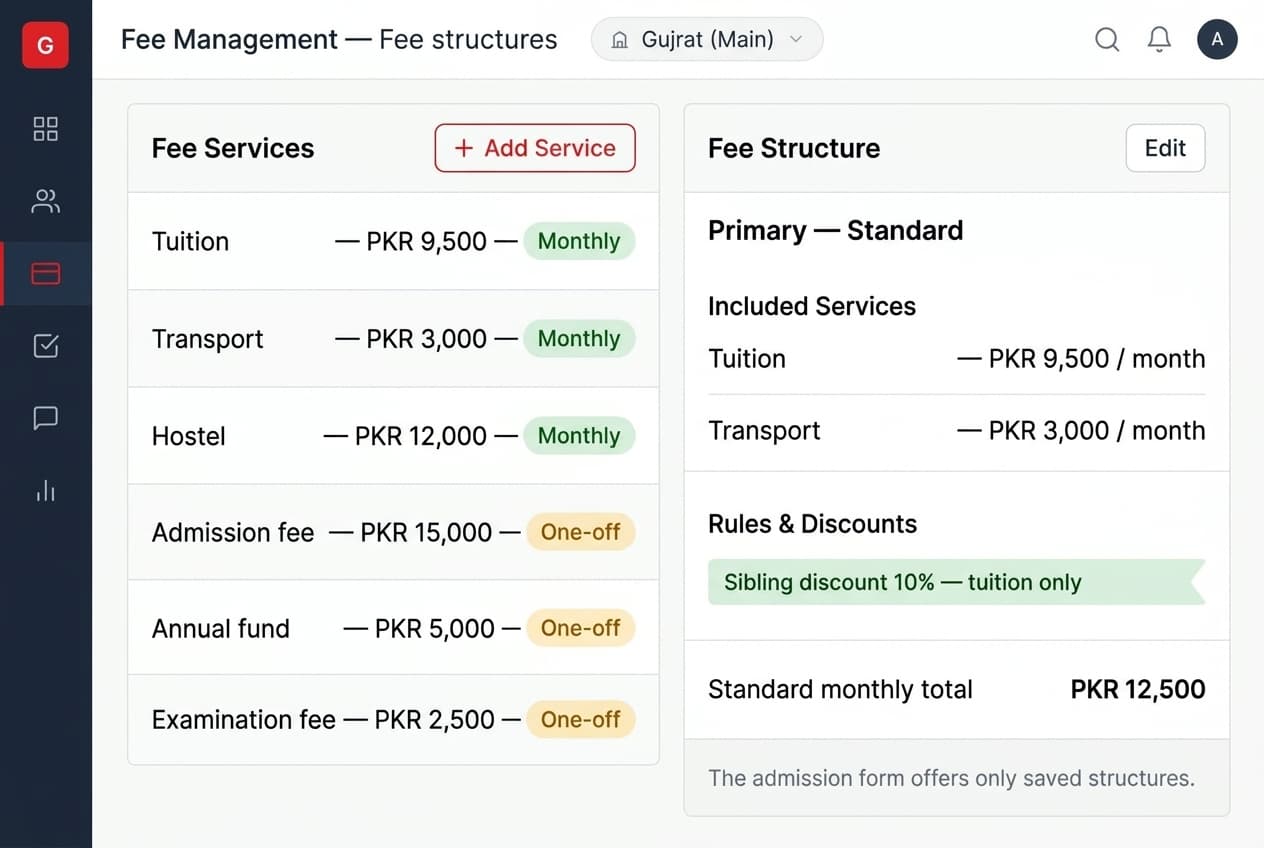
Every charge your school makes is defined once as a service, and marked either monthly — tuition, transport, hostel, attached to the student and appearing on every voucher automatically — or one-off, for admission, annual fund or examination charges that you add when you need them.
Services group into categories you choose, so you can answer "how much did we collect against transport this year" without adding up lines by hand.
Decide how much freedom your office has
Some schools want their front office choosing services and discounts freely per student. Others want that locked down.
Define fee structures — fixed combinations of services and discounts — and the admission form offers only those. Staff pick a structure instead of assembling one, which means two children admitted by two different people on the same day end up on the same terms.
Billing periods you can report on separately
Each voucher belongs to a fee title — usually the month, but it can be anything you want to track on its own. Schools that create a separate "Admission Fee 2026" title can answer how much came in against admissions that year without separating it out of the monthly figures afterwards.
Generate vouchers for the whole campus in one pass
Run vouchers campus-wise for every student at once, batch-wise for a single class with a preview of the amounts before you commit, or student-wise when one family needs something different. The monthly run is one action.
Every voucher carries your school's logo and your own notice text at the foot.
Charge for more than one month at a time
Set how many months a voucher covers and the amounts multiply. One voucher for a quarter, or one covering the summer break, instead of three sent separately.
Where some of your families pay monthly and others quarterly, payment cycles let you generate for one group without touching the other.
Bill the family, or bill the student
Some schools send one voucher per child. Others send one to the family covering every child enrolled. Both models are supported, and you choose which fits your parents.
The family model matters more than it sounds. A parent with three children receives one voucher, pays once, and sees one balance.
Discounts, scholarships and fines that calculate themselves
Discounts
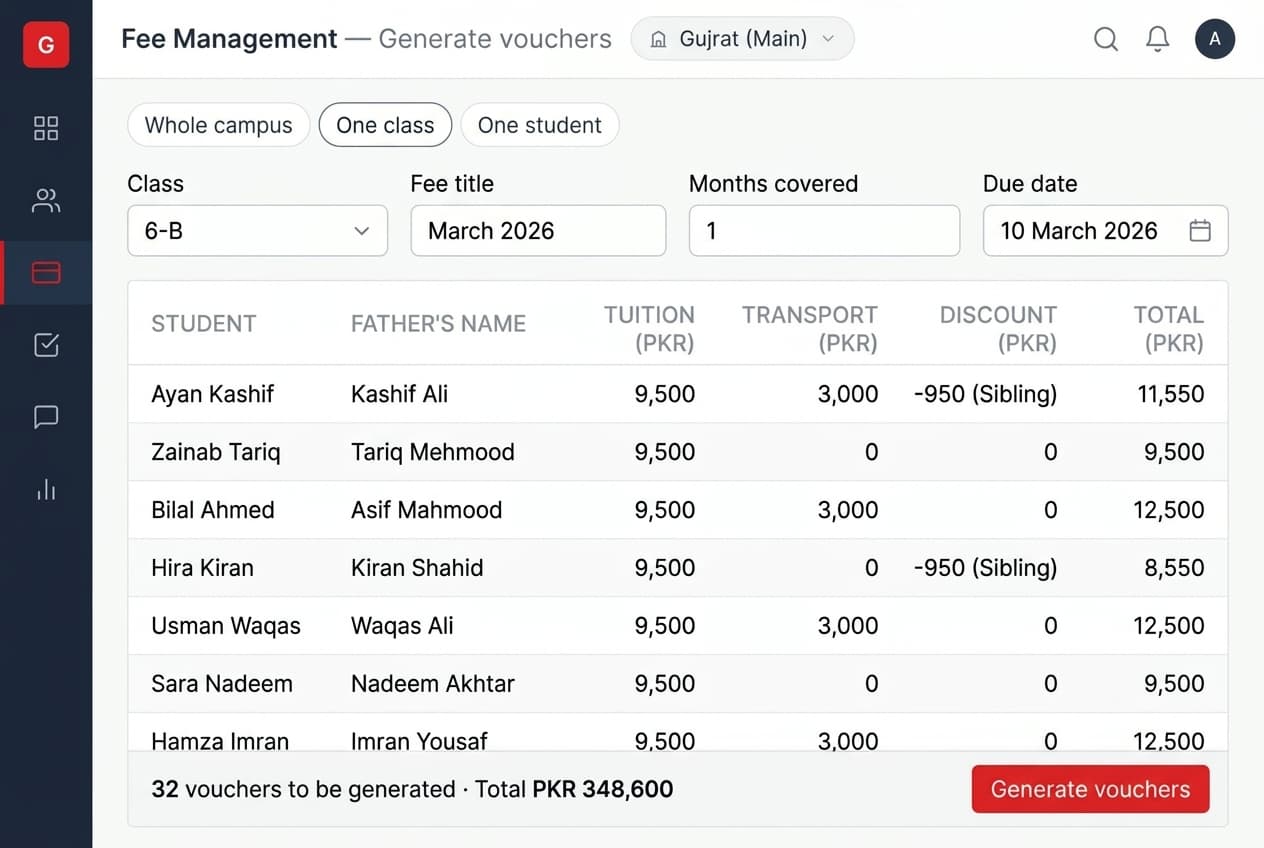
Set up sibling discounts, staff-child discounts or any other arrangement once, as an amount or a percentage. They apply themselves at voucher generation. A discount can be tied to a specific service — tuition only, leaving transport at full rate.
Scholarships are not discounts
This distinction matters to anyone who reports to a board or a trust.
A discount means the student pays less. Income is reduced and nothing else is recorded.
A scholarship means the school absorbs the cost. Full income is recorded, and the amount given is recorded separately as an expense against an account you nominate.
If you want to answer "how much did we give away in aid this year" with a number rather than an estimate, that is why the distinction exists.
More than one scholarship can sit on the same service, which schools running merit and need-based awards together need regularly.
Students on full scholarship
Mark a one-off charge so that students on a hundred per cent discount are skipped. Full-scholarship students stop receiving activity and examination vouchers that were never meant for them, without anyone remembering to exclude them each time.
Fines that match how late the payment is
A fine can be a flat amount, a percentage of the balance, or a daily charge capped at a number of days you set.
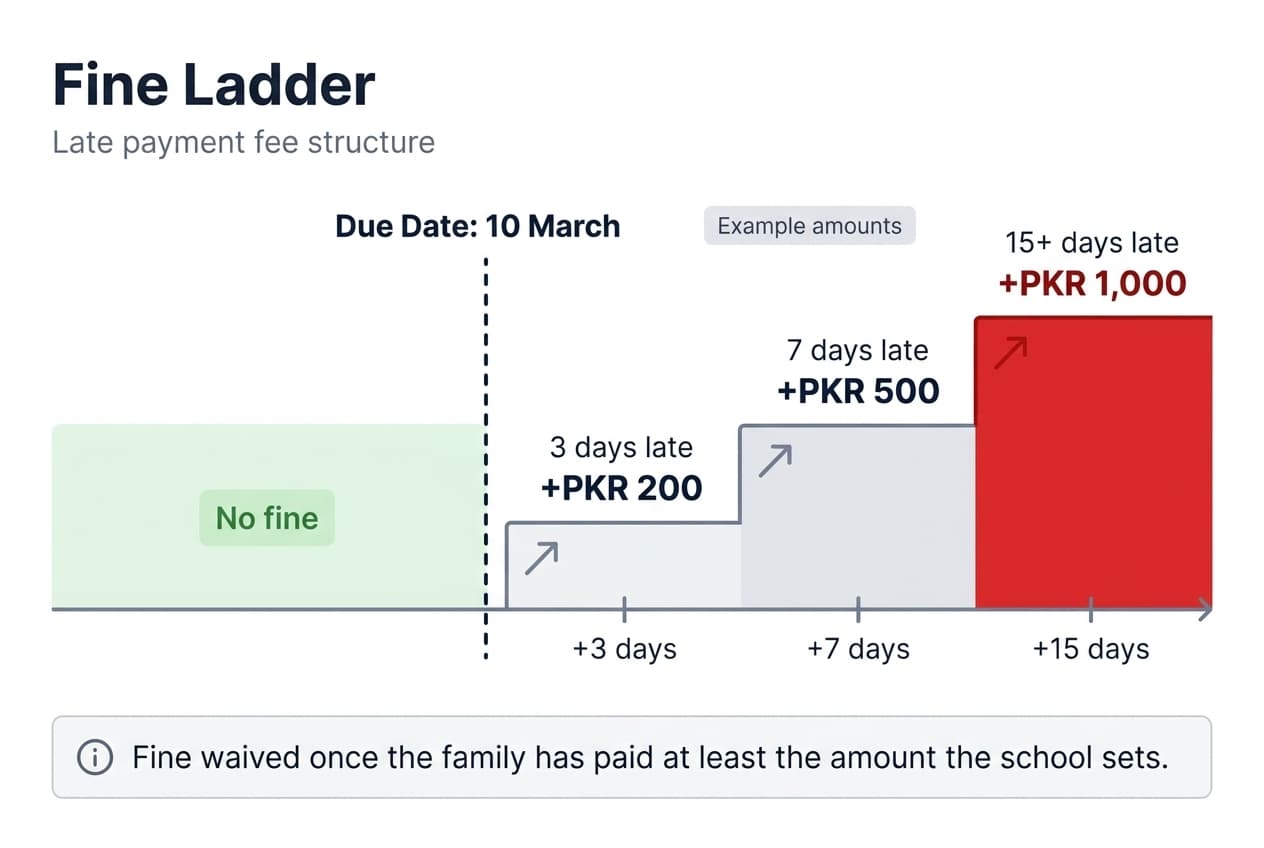
It can also be tiered. Set a ladder — one amount if the family is three days late, more at seven days, more again at fifteen — and the system applies the right step for how late the payment actually is. A family a day over does not pay what a family two months over pays.
You can also set a threshold: if a parent has paid at least a certain amount, the fine is waived. That closes the loophole where paying a token amount cancelled the whole fine.
A fine only applies after the due date, and never before.
Refundable money stays separate from income
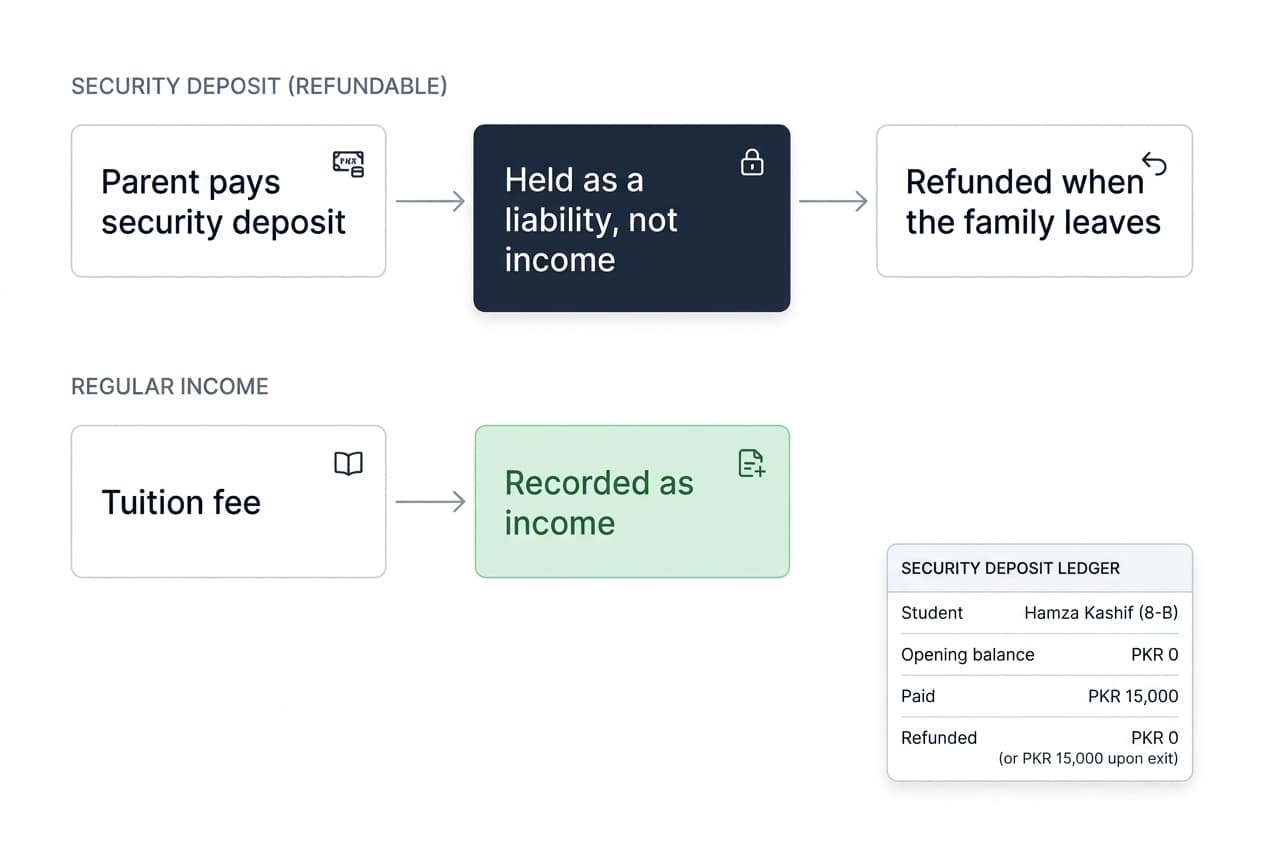
Security deposits and caution money are not revenue, and treating them as revenue distorts every financial statement a school produces.
Mark a service as refundable and it carries both an income account and a liability account. The money sits as a liability until it is refunded, with opening balance, payments and refund tracked per student — so when a family leaves, the amount to return is a figure rather than a search through old receipts.
Tax works the same way. A tax rule sits against taxable services, the amount collects into a liability account, and you remit it onward. You choose per service whether tax is calculated on the full amount or on what the family pays after discount, because some charges are taxed on the sticker price and others are not.
When a provincial rate changes, your own accounts team updates the rule — no support ticket, no waiting for us.
The controls that stop the quiet problems
Fee is where money and people meet, so the controls matter as much as the arithmetic.
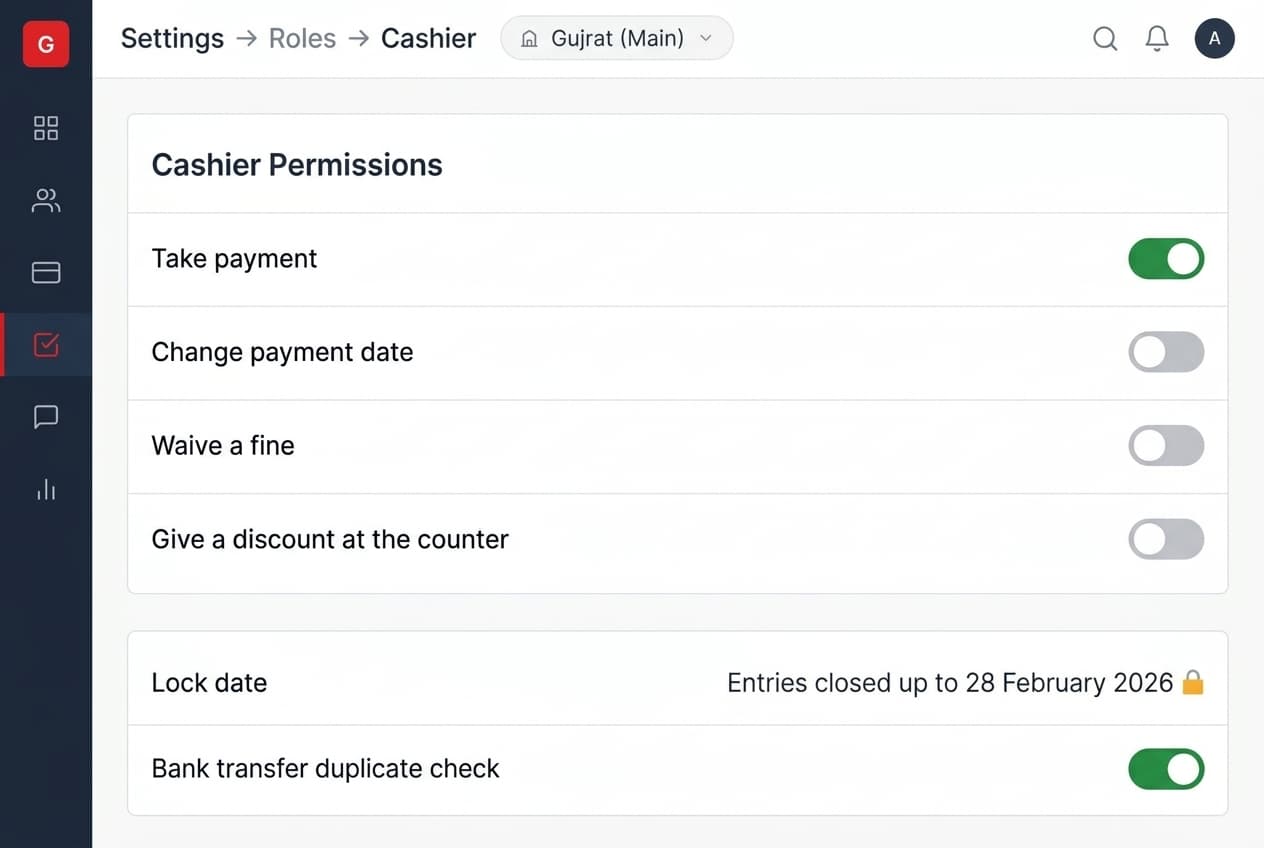
Every payment carries the cashier who took it. Back-dating a receipt needs a permission most cashiers do not have — without it the system posts today's date whatever is typed. Skipping a fine and granting a discount at the counter are each separate permissions.
A payment entered by bank transfer is checked against reference numbers already used at your school, so the same transaction number cannot be recorded twice.
Set a lock date and closed periods stop accepting entries. And once a payment has been recorded against a voucher, that voucher is locked — because editing it would leave the receipt and the ledger disagreeing. A missed charge becomes a supplementary voucher instead.
Print the voucher your parents already recognise
Schools do not want a new voucher design. They want the one their parents already know.
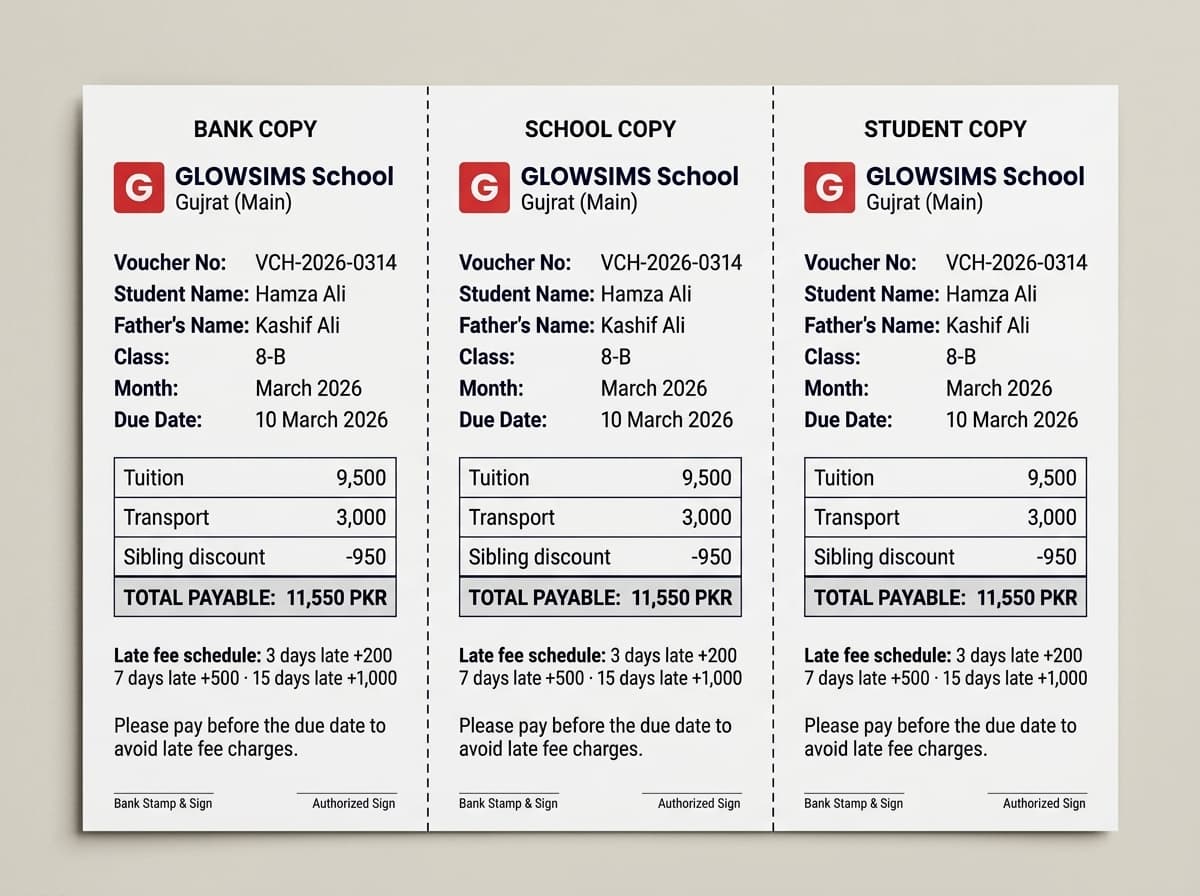
There are a large number of print layouts — one student copy with three bank copies, two per page, four per page, with or without discount shown, with or without the balance. During implementation we find the one closest to what you issue now.
A voucher can show the fine schedule ahead of time, so a parent sees what they will owe if they pay late rather than discovering it afterwards. A paid stamp can print on receipts. Previous balance is worked out as the voucher prints, so it is never stale.
There is also a blank template to keep in the drawer — for the day a family walks in during a power cut.
Over eighty fee reports
Collection summary. Daily and weekly cash. Online against offline. Family-wise receivables. Defaulter age buckets. Voucher history per family. Collection against target. Statements per student, and per family across siblings.
Most schools use six of them. The rest exist because, at some point, a school asked.
Before you ask
Questions schools ask
Can we give sibling discounts?
Yes — as an amount or a percentage. Set the rule once and it applies automatically when vouchers are generated. You can also tie a discount to one service, so it reduces tuition without touching the transport charge.
What is the difference between a discount and a scholarship?
A discount means the student pays less, so your income is simply lower. A scholarship means the school absorbs the cost — the full fee is recorded as income, and the amount you gave is recorded separately as an expense. Schools that need to report on the aid they provide use scholarships.
Can the late fee increase the longer a family delays?
Yes. A fine can be set as a ladder — one amount at three days late, a higher one at seven, higher again at fifteen — and the system applies the step that matches. You can also waive the fine once a family has paid above an amount you set.
Can parents pay online?
Yes. Online fee collection connects your school to more than thirty banks, and parents pay from the Talib app. Your cashier sees the payment as it arrives.
Can we generate vouchers for the whole school at once?
Yes. Vouchers can be generated campus-wise for every student, batch-wise for one class, or student-wise for an individual. Most schools run the whole campus once a month in a single pass.
Can one voucher cover a whole quarter?
Yes. Set how many months the voucher covers and the amounts multiply. Schools use this for quarterly families and for the summer break.
What happens if a parent overpays?
The extra amount sits on the student's account as advance fee and is applied automatically to the next voucher. Nothing is lost and nobody has to remember.
Can we take a security deposit without it counting as income?
Yes. A refundable service carries a separate liability account, so the deposit is tracked as money you hold rather than money you earned, with the refund flow built in.
Can one parent get a single voucher covering all their children?
Yes. Bill per child or bill the family, whichever suits your parents. On the family model a parent with three children receives one voucher, pays once, and sees one balance.
Can we stop cashiers back-dating receipts?
Yes. Changing the payment date is a separate permission. Without it, the system records today's date regardless of what is entered.